

To install a WordPress Theme you must have a working version of WordPress already installed. For information regarding installation of the WordPress platform, please see the WordPress Codex.
1. Login to your WordPress Dashboard and go to Appearance → Themes. Click “Add New“.

Figure 1: The Appearance > Themes section.
2. On the “Add Themes” screen, click “Upload Theme”.
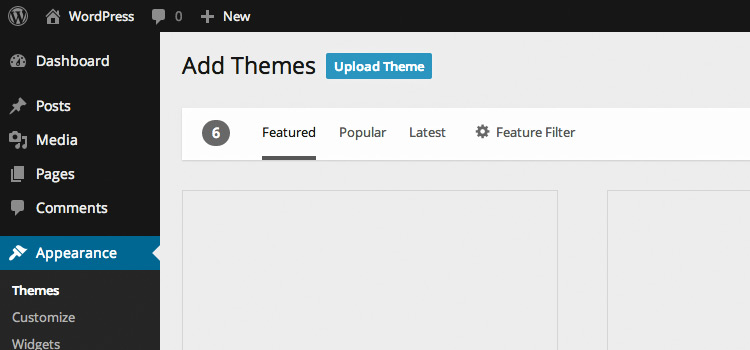
Figure 2: The “Add Themes” screen.
3. Choose the theme zip file you downloaded from NiceThemes and click the “Install Now” button.
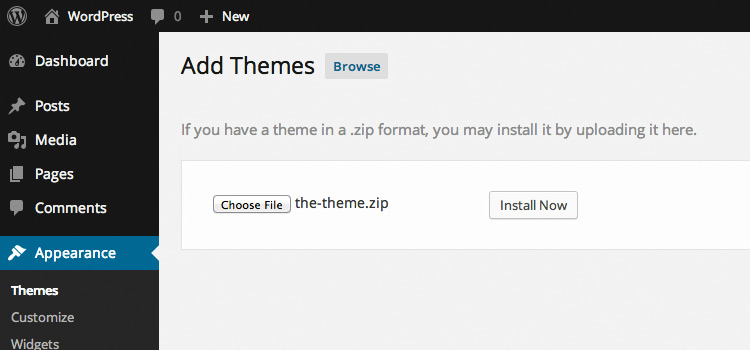
Figure 3: Uploading the Theme zip file.
4. Activate your Theme by clicking the “Activate” link.
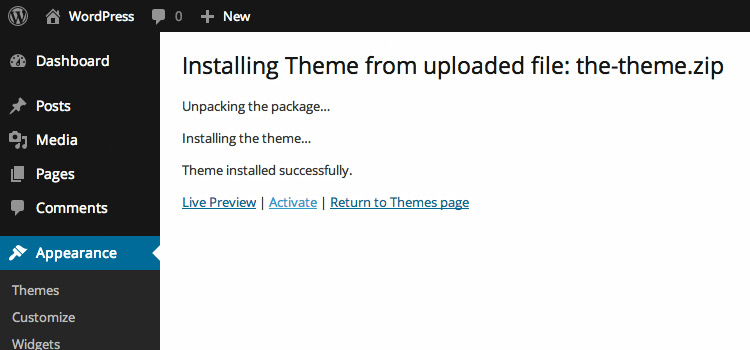
Figure 4: Activating the WordPress theme.
That’s all you need to do to install your WordPress theme. Some themes need some shifting around of the Widgets and Page Templates.